Transparent PNGs break AI upscalers: the dark halo bug
Feed a PNG with transparency (a cut-out photo, a sticker export) to almost any AI upscaler and a specific defect appears: a dark halo creeping a few pixels into the subject from every transparent edge, with a faint bright overshoot ring behind it. It hides on dark previews and glares on white pages. We reproduced it on our own pipeline, measured its exact shape (a −94-luma trench, three model-pixels wide), traced it to the web platform's premultiplied-alpha round-trip, and measured the fix we ship: an O(n) flood fill that removes 98% of the error before the model ever runs.
Every number in this note was measured on the production pipeline code: same models, same math. Raw per-image records: e3_alpha.json.
1 · Where the black comes from
The web's 2D canvas stores pixels premultiplied: not (r, g, b, α) but (rα, gα, bα, α). Compositing loves this format (the Porter–Duff operators[1] become single multiply-adds), but it is lossy in exactly one place. Reading pixels back means dividing color by α:
At α = 0 that is 0/0, and the platform's answer[2] is that there is nothing left to recover: the color was multiplied by zero the moment it touched the canvas. getImageData returns RGB (0, 0, 0) under every fully transparent pixel. Your cut-out's transparent field has silently become a lake of pure black.
A human never sees the lake: alpha hides it. A super-resolution network is not a human: it consumes three channels of RGB and no alpha, so it sees a photograph embedded in vantablack, and every output pixel near the boundary is computed from a receptive field that dips into the lake. The black does not stay put; it diffuses inward through the convolution stack[3].
2 · Measuring the halo
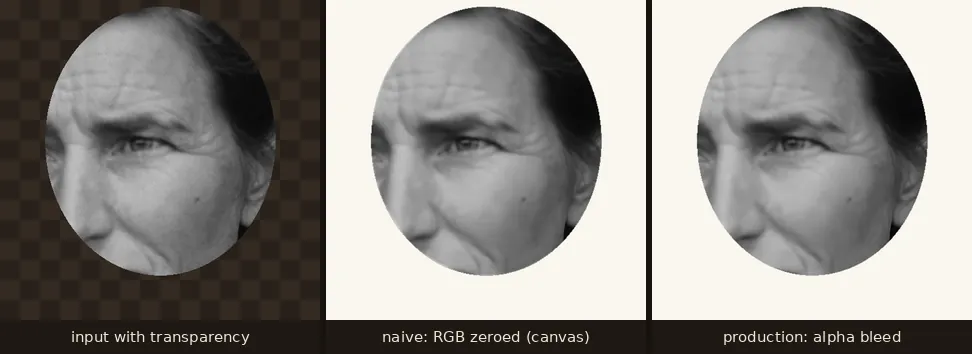
One genuinely counter-intuitive measurement: we expected the model to hallucinate garbage inside the transparent region, “enhance the void.” It doesn't. Flat black in, flat black out (gradient energy 0.1). The harm is not what the model invents in the void; it is what the void does to the subject across the boundary. That matters because it means masking the output cannot save you: the damaged pixels are inside the visible region, under α > 0.
3 · The fix: flood the void with plausible color
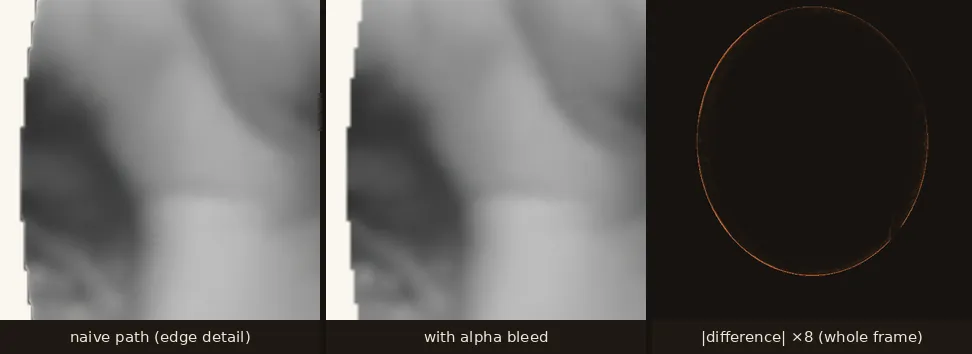
If the model must see RGB under α = 0, make it RGB that continues the subject. Before inference we run alpha bleeding: a multi-source breadth-first flood from every non-transparent pixel, where each transparent pixel takes the mean color of its already-colored 4-neighbours:
Seeding the queue with the boundary ring and processing FIFO guarantees every dequeued pixel has at least one colored neighbour (whoever enqueued it finished first), so one O(n) pass colors the entire void: unlimited distance, enclosed holes included. Alpha bytes are never touched; semi-transparent pixels keep their own color. The model then sees a smooth continuation instead of a cliff, and alpha (upscaled separately) is reapplied on the way out. Measured effect: the 0–3 px band error drops from -62.9 to 1.1 luma levels, a 63× reduction, at no measurable runtime cost.
4 · What this means for your images
If you use this site: nothing; transparent PNGs take the measured path above in the cloud pipeline and the in-browser fallback engine alike, since both share the same pure library. If you build image tools: treat every RGB-only model as allergic to premultiplied zeros: bleed before inference (the flood above is ~30 dependency-free lines), or matte onto a solid color and accept the matte's bias. And if you are diagnosing a mystery dark edge in someone's enhancer output, you now know the fingerprint: a trench a few pixels wide, an overshoot ring behind it, and a perfect correlation with the alpha boundary. The three numbers to remember: −94, 3 px, 63×.
References
- Porter, T., & Duff, T. (1984). Compositing Digital Images. SIGGRAPH '84, Computer Graphics 18(3), 253–259. (The premultiplied-alpha compositing algebra.) dl.acm.org
- WHATWG HTML Living Standard, the 2D canvas element: premultiplied backing stores and the lossy getImageData round-trip for non-opaque pixels. html.spec.whatwg.org
- Wang, X., Xie, L., Dong, C., & Shan, Y. (2021). Real-ESRGAN: Training Real-World Blind Super-Resolution with Pure Synthetic Data. ICCV Workshops. arXiv:2107.10833. arxiv.org
- Lange, D. (1936). “Migrant Mother” (Destitute pea pickers in California), Farm Security Administration. Public domain, via Wikimedia Commons. commons.wikimedia.org
- ONNX Runtime: the inference engine both our server (CPU) and in-browser (WebGPU/WASM) engines run on. onnxruntime.ai